
The Rocket Blog
The Rocket Blog is where we share our experiences and reflect on a selection of our favourite moments.
If you’d like to share your opinion or join the conversation, please do so by joining us on our socials.
Book 20 minutes with your CEO.
Grab your phone or office video camera and tripod. You can shoot an excellent video with a phone by using the right settings. You can find our Phone filming settings here.
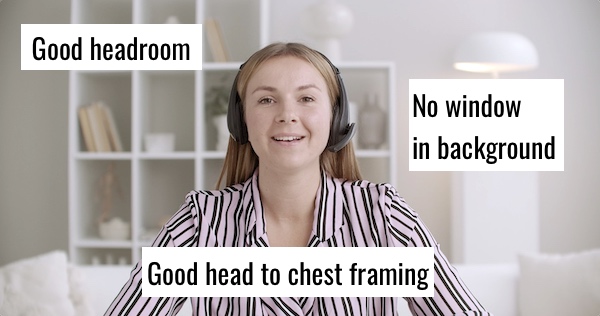
Prepare your shot in your chosen location, using this shot below as your guide. Get your CEO to stand in front of their desk or somewhere that looks good in your office.
If you’re not sure what to say in the video, use these easy script bullet points:
And that’s it.
Do each line separately as it’ll be easier for your CEO in the 20 minutes you’ve booked with them.
Join the bits together in your editing program. That should take you about an hour, or just 10 minutes if your CEO nailed the bullet points in one take.
A simple low-fi video like this boosts staff morale and takes minimal effort. While more time grants for fancy and higher calibre, it doesn’t need to be fancy at all — it’s all about the message. If you’re pressed for time, don’t worry about adding music, instead just get your CEO to be warm.
If you’ve got more time, you can finish your thank you message with a montage of moments from throughout the year. Showcase key events, different office teams, award wins, funny moments, and add graphics to call out stellar company figures and achievements.
Want some help? We’ve got a few small spaces left to quickly help edit or film. Send us an email via our Contact Us page or call us on
The Rocket Blog is where we share our experiences and reflect on a selection of our favourite moments.
If you’d like to share your opinion or join the conversation, please do so by joining us on our socials.